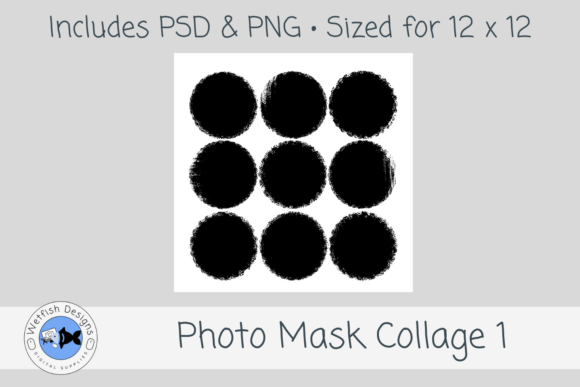
Transforming Memories with PSD Photo Mask Collage 1
In the realm of digital design and scrapbooking, the transition from traditional paper crafts to high-quality digital layouts has revolutionized how individuals preserve their history. At the forefront of this evolution is PSD Photo Mask Collage 1, a specialized tool that bridges the gap between artistic expression and technical precision. This layered template is not merely a collection of shapes; it is a comprehensive solution designed for 12 x 12 scrapbook pages that allows creators to produce professional-grade memory keeping projects with ease.
The modern creator faces a unique challenge: the desire for an authentic, handcrafted aesthetic often clashes with the limitations of time and software proficiency. Traditional masking requires manual selection tools, complex layer adjustments, and a steady hand to achieve soft edges or distressed looks. PSD Photo Mask Collage 1 addresses these pain points by offering a pre-configured environment where the heavy lifting is done before the user even opens the file. The result is a versatile asset suitable for school memory pages, family layouts, yearbooks, classroom projects, albums, and printable keepsakes.
The Artistic Foundation: Distressed Circular Design
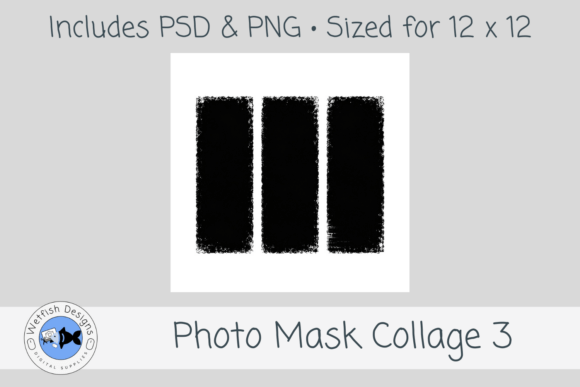
What distinguishes this template from generic grid layouts is its specific aesthetic approach. The set features a distressed 9-circle photo mask arrangement that embodies a hand-painted, grungy edge style. This design choice is critical for designers who wish to avoid the sterile look of standard rectangular crops. Instead, the photos are presented within soft circular spots that appear as if they were cut out by hand, adding texture and depth to the final composition.
This distressed circular mask style serves multiple visual functions. First, it draws the eye naturally to the center of the image, creating a focal point that guides the viewer through the narrative of the page. Second, the grunge elements add a sense of history and nostalgia, making the layout feel like a tangible artifact rather than a digital file. Whether used for back-to-school layouts, childhood memories, sports pages, family albums, vacation pages, senior pages, or everyday memory keeping, the artistic integrity remains consistent.
The inclusion of both a PSD layered file and a PNG photo mask file ensures maximum flexibility. The PSD version allows for deep customization, enabling users to adjust layer styles, blend modes, and text effects directly within Adobe Photoshop. Meanwhile, the PNG mask provides a quick solution for users working in different software environments or those who need to import the mask into web-based design tools without needing the full Photoshop suite.
Technical Specifications and Workflow Integration
For professionals and hobbyists alike, the technical specifications of a template determine its usability in real-world scenarios. PSD Photo Mask Collage 1 is sized specifically for 12 x 12 layouts, which is the industry standard for physical scrapbooking and printing. This dimension ensures that when a user prints their creation, the proportions remain true to the original design intent without awkward cropping or stretching.
A crucial aspect of the template's quality is its resolution. Designed at 300 dpi, the file meets the rigorous standards required for high-quality printing. This resolution guarantees that the edges of the masks remain crisp and clear, even when printed on glossy photo paper or textured cardstock. For educators and researchers studying digital preservation, this attention to detail highlights the importance of source file quality in maintaining the longevity of digital archives.
The workflow integration is streamlined to accommodate various skill levels. A beginner can simply drag and drop their images into the designated layers, while an advanced designer can utilize the layer groups to create complex backgrounds, add vector textures, or apply custom color grading. The "Photos shown in the preview are for display inspiration only" disclaimer is standard practice, reminding users that the true potential lies in their own content. This separation of template and content empowers the user to tell their unique story without being constrained by the placeholder imagery.
Diverse Applications Across Professional and Personal Sectors
The versatility of PSD Photo Mask Collage 1 extends far beyond simple personal hobbies. Its application spans a wide array of sectors, each leveraging the template's structure for specific outcomes.
- Educational Institutions: Teachers and administrators often struggle to create engaging yearbooks or end-of-year reports. Using this template, educators can quickly assemble student portfolios, highlight classroom achievements, or document field trips. The 9-circle arrangement allows for a dynamic presentation of group photos and individual portraits, fostering a sense of community among students.
- Professional Photographers: For photographers looking to offer additional products to their clients, such as anniversary gifts or family reunion albums, this template offers a polished finish. It eliminates the need to manually mask dozens of images, allowing the photographer to focus on lighting and composition while the template handles the layout mechanics.
- Corporate and Business Owners: Small business owners and entrepreneurs often need to create internal newsletters or client appreciation books. The grungy, artistic style adds a human touch to corporate communications, making them feel more personal and less bureaucratic. It is an excellent tool for showcasing team culture or documenting company milestones.
- Researchers and Historians: In academic settings, visual storytelling is becoming increasingly important. Researchers compiling data on cultural events or historical timelines can use these collages to present archival photographs in a cohesive manner, enhancing the narrative flow of their presentations or publications.
Bridging the Gap Between Digital and Analog
One of the most compelling arguments for using PSD Photo Mask Collage 1 is its ability to bridge the gap between digital efficiency and analog charm. In an era dominated by flat, minimalist interfaces, there is a growing consumer demand for designs that feel tactile and organic. The hand-painted, grungy edge style mimics the imperfections of physical media, satisfying a psychological desire for authenticity.
This aesthetic is particularly effective for themes involving childhood memories or vintage subjects. When a user places a photograph of a grandparent's wedding or a child's first day of school into one of these distressed circles, the frame itself contributes to the emotional resonance of the image. The rough edges suggest age and wear, reinforcing the sentiment that the memory is precious and enduring. This is a subtle but powerful design technique that elevates the perceived value of the final product.
Furthermore, the template supports the trend of hybrid scrapbooking. Many enthusiasts now print digital layouts to combine with physical embellishments like ribbons, stickers, and handwritten notes. Because the template is optimized for 12 x 12 printing at 300 dpi, it integrates seamlessly into these hybrid workflows. The clean layers allow for easy printing, while the artistic style ensures the base page looks finished even before physical additions are made.
Considerations for Implementation and Customization
While the template is designed for ease of use, successful implementation requires a basic understanding of digital design principles. Users should be aware that the success of the collage depends heavily on the quality of the source images. Since the masks are circular and relatively large, low-resolution photos may appear pixelated when printed. Therefore, it is advisable to use high-quality originals whenever possible.
Additionally, the arrangement of the nine circles creates a specific visual rhythm. Designers must consider the balance of the page when selecting photos. Placing a dark, heavy image next to a light, airy one might create an unintended visual weight imbalance. However, this constraint can also be seen as a creative opportunity, encouraging users to think critically about contrast, color harmony, and subject matter distribution.
The layered nature of the PSD file also offers opportunities for experimentation. Users can duplicate the mask layers to create variations, change the opacity to blend images with background textures, or apply adjustment layers to unify the color palette across disparate photos. These capabilities make the template a living resource that can evolve with the user's skills and project requirements.
The Future of Memory Keeping
As we move further into the digital age, the methods by which we preserve our history are evolving. The shift from physical albums to digital files is irreversible, yet the desire for a tangible connection to our past remains strong. Tools like PSD Photo Mask Collage 1 represent a convergence of these trends, offering a way to maintain the soul of scrapbooking while embracing the power of technology.
For the broad audience of professionals, consumers, creators, educators, researchers, hobbyists, and business owners, this template provides a reliable foundation for storytelling. It removes the technical barriers that often prevent people from expressing themselves visually. By providing a structured yet flexible canvas, it encourages creativity and ensures that the focus remains on the content—the memories, the stories, and the moments that define us.
In conclusion, whether you are designing a yearbook for a school district, curating a portfolio for a photography client, or simply organizing your family's vacation snaps, PSD Photo Mask Collage 1 stands as a testament to the potential of digital design. Its combination of artistic flair, technical precision, and practical utility makes it an indispensable asset for anyone dedicated to the art of memory keeping. As we continue to document our lives, having access to such robust and adaptable tools ensures that our stories will be told with clarity, beauty, and lasting impact.